

This project provides build scripts to run Claude Desktop natively on Linux systems. It repackages the official Windows application for Linux distributions, producing .deb packages (Debian/Ubuntu), .rpm packages (Fedora/RHEL), distribution-agnostic AppImages, an AUR package for Arch Linux, and a Nix flake for NixOS.
Note: This is an unofficial build script. For official support, please visit Anthropic's website. For issues with the build script or Linux implementation, please open an issue in this repository.
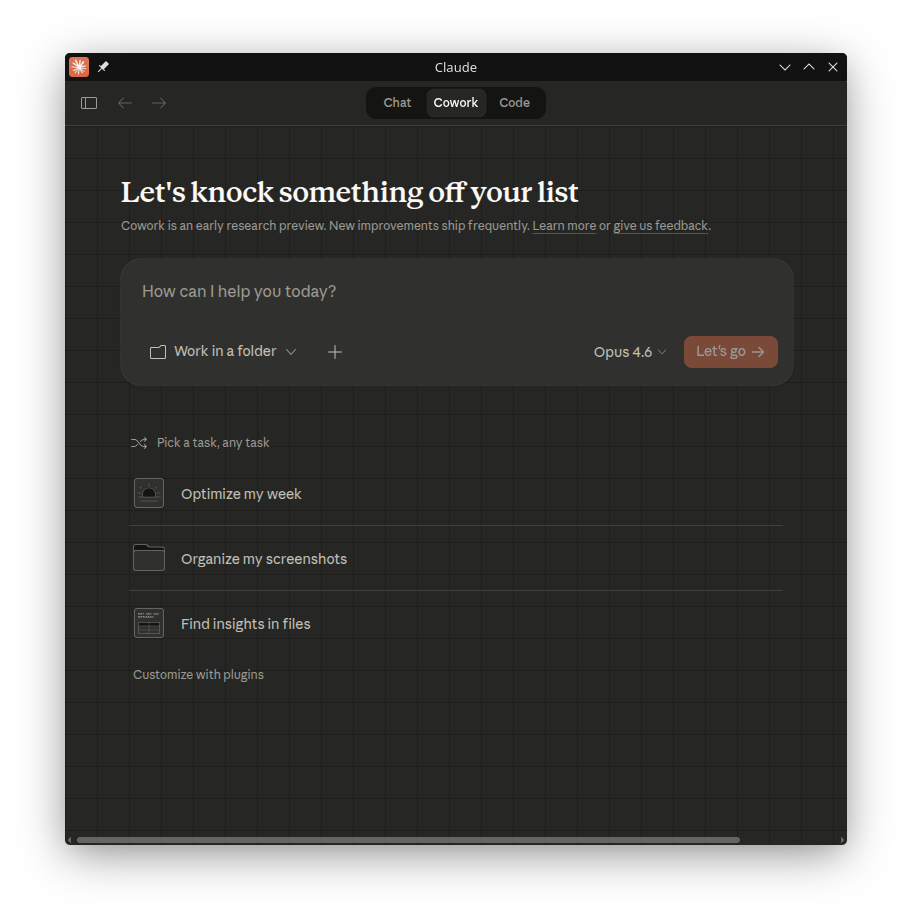
⚠️ EXPERIMENTAL: Cowork Mode Support Cowork mode is enabled by default in this build. It uses Anthropic's native VM images with a pluggable isolation backend:
Backend Isolation Requirements KVM (preferred) Full VM via QEMU/KVM /dev/kvm,qemu-system-x86_64,/dev/vhost-vsock,socat,virtiofsdbubblewrap (fallback) Namespace sandbox bwrapinstalled and functionalhost (last resort) None — runs directly on host No additional requirements The best available backend is auto-detected at startup. Run
claude-desktop --doctorto check which backend will be used and which dependencies are missing.Note: The bubblewrap backend mounts your home directory as read-only (only the project working directory is writable). The host backend provides no isolation — use it only if you understand the security implications.
- Native Linux Support: Run Claude Desktop without virtualization or Wine
- MCP Support: Full Model Context Protocol integration
Configuration file location:
~/.config/Claude/claude_desktop_config.json - System Integration:
- Global hotkey support (Ctrl+Alt+Space) - works on X11 and Wayland (via XWayland)
- System tray integration
- Desktop environment integration

Add the repository for automatic updates via apt:
# Add the GPG key
curl -fsSL https://aaddrick.github.io/claude-desktop-debian/KEY.gpg | sudo gpg --dearmor -o /usr/share/keyrings/claude-desktop.gpg

# Add the repository
echo "deb [signed-by=/usr/share/keyrings/claude-desktop.gpg arch=amd64,arm64] https://aaddrick.github.io/claude-desktop-debian stable main" | sudo tee /etc/apt/sources.list.d/claude-desktop.list

# Update and install
sudo apt update
sudo apt install claude-desktop
Future updates will be installed automatically with your regular system updates (sudo apt upgrade).
Add the repository for automatic updates via dnf:
# Add the repository
sudo curl -fsSL https://aaddrick.github.io/claude-desktop-debian/rpm/claude-desktop.repo -o /etc/yum.repos.d/claude-desktop.repo

# Install
sudo dnf install claude-desktop
Future updates will be installed automatically with your regular system updates (sudo dnf upgrade).
The claude-desktop-appimage package is available on the AUR and is automatically updated with each release.
# Using yay
yay -S claude-desktop-appimage

# Or using paru
paru -S claude-desktop-appimage
The AUR package installs the AppImage build of Claude Desktop.
Install directly from the flake:
# Basic install
nix profile install github:aaddrick/claude-desktop-debian

# With MCP server support (FHS environment)
nix profile install github:aaddrick/claude-desktop-debian#claude-desktop-fhs
Or add to your NixOS configuration:
# flake.nix
{
  inputs.claude-desktop.url = "github:aaddrick/claude-desktop-debian";

  outputs = { nixpkgs, claude-desktop, ... }: {
    nixosConfigurations.myhost = nixpkgs.lib.nixosSystem {
      modules = [
        ({ pkgs, ... }: {
          nixpkgs.overlays = [ claude-desktop.overlays.default ];
          environment.systemPackages = [ pkgs.claude-desktop ];
        })
      ];
    };
  };
}
Download the latest .deb, .rpm, or .AppImage from the Releases page.
See docs/BUILDING.md for detailed build instructions.
Model Context Protocol settings are stored in:
~/.config/Claude/claude_desktop_config.json
For additional configuration options including environment variables and Wayland support, see docs/CONFIGURATION.md.
Run claude-desktop --doctor for built-in diagnostics that check common issues (display server, sandbox permissions, MCP config, stale locks, and more). It also reports cowork mode readiness — which isolation backend will be used, and which dependencies (KVM, QEMU, vsock, socat, virtiofsd, bubblewrap) are installed or missing.
For additional troubleshooting, uninstallation instructions, and log locations, see docs/TROUBLESHOOTING.md.
This project was inspired by k3d3's claude-desktop-linux-flake and their Reddit post about running Claude Desktop natively on Linux.
Special thanks to:
- k3d3 for the original NixOS implementation and native bindings insights
- emsi for the title bar fix and alternative implementation approach
- leobuskin for the Playwright-based URL resolution approach
- yarikoptic for codespell support and shellcheck compliance
- IamGianluca for build dependency check improvements
- ing03201 for IBus/Fcitx5 input method support
- ajescudero for pinning @electron/asar for Node compatibility
- delorenj for Wayland compatibility support
- Regen-forest for suggesting Gear Lever as AppImageLauncher replacement
- niekvugteveen for fixing Debian packaging permissions
- speleoalex for native window decorations support
- imaginalnika for moving logs to
~/.cache/ - richardspicer for the menu bar visibility fix on Linux
- jacobfrantz1 for Claude Desktop code preview support and quick window submit fix
- janfrederik for the
--exeflag to use a local installer - MrEdwards007 for discovering the OAuth token cache fix
- lizthegrey for version update contributions
- mathys-lopinto for the AUR package and automated deployment
- pkuijpers for root cause analysis of the RPM repo GPG signing issue
- dlepold for identifying the tray icon variable name bug with a working fix
- Voork1144 for detailed analysis of the tray icon minifier bug, root-cause analysis of the Chromium layout cache bug, and the direct child
setBounds()fix approach - sabiut for the
--doctordiagnostic command - milog1994 for Linux UX improvements including popup detection, functional stubs, and Wayland compositor support
- jarrodcolburn for passwordless sudo support in container/CI environments
- chukfinley for experimental Cowork mode support on Linux
- IliyaBrook for fixing the platform patch for Claude Desktop >= 1.1.3541 arm64 refactor
- MichaelMKenny for diagnosing the
$-prefixed electron variable bug with root cause analysis and workaround - daa25209 for detailed root cause analysis of the cowork platform gate crash and patch script
- noctuum for the
CLAUDE_MENU_BARenv var for configurable menu bar visibility - typedrat for the NixOS flake integration with build.sh, node-pty derivation, and CI auto-update
Anthropic doesn't publish release notes for Claude Desktop. Each release here includes AI-generated notes that analyze code changes between versions. I wrote up how that process works if you're curious: Generating Real Release Notes from Minified Electron Apps.
The analysis runs against Claude's API. Costs vary a lot depending on how big the update is. Recent releases have run between 76.16 per release.
If this project is useful to you, consider sponsoring on GitHub to help cover those costs.
The build scripts in this repository are dual-licensed under:
- MIT License (see LICENSE-MIT)
- Apache License 2.0 (see LICENSE-APACHE)
The Claude Desktop application itself is subject to Anthropic's Consumer Terms.
Contributions are welcome! By submitting a contribution, you agree to license it under the same dual-license terms as this project.
