

WARNING
OpenClaw 3.1+ 升级必读:升级到 OpenClaw 3.1 及以上版本的用户务必同步升级本插件,并将企业微信回调 URL 更新为 OpenClaw 推荐路径:/plugins/wecom/bot/{accountId} 与 /plugins/wecom/agent/{accountId}(旧 /wecom/* 仍兼容但不再维护)。


WARNING
原创声明:本项目涉及的“多账号隔离与矩阵路由架构”、“Bot+Agent双模融合架构”、“长任务超时接力逻辑”及“全自动媒体流转接”等核心设计均为作者 YanHaidao 独立思考与实践的原创成果。 欢迎技术交流与合规引用,但严禁任何不经授权的“功能像素级抄袭”或删除原作者署名的代码搬运行为。
🚀 企业级双模式 AI 助手接入方案
💡 核心价值 • 📊 模式对比 • 一、快速开始 • 二、配置说明 • 七、联系我
传统的企微插件通常只能在 "只能聊天的机器人 (Bot)" 和 "只能推送的自建应用 (Agent)" 之间二选一。 本插件采用 双模并行架构,同时压榨两种模式的极限能力:
- Bot 通道 (智能体):负责 实时对话。提供毫秒级流式响应(打字机效果),零延迟交互。
- Agent 通道 (自建应用):负责 能力兜底。当需要发送图片/文件、进行全员广播、或 Bot 对话超时(>6分钟)时,无缝切换到 Agent 通道接管。
本插件支持 无限扩展的账号矩阵,这是本插件区别于普通插件的核心壁垒:
- 完全隔离 (Isolation):不同
accountId之间的会话、动态 Agent、上下文完全隔离,互不串扰。 - 矩阵绑定 (Binding):支持一个 OpenClaw 实例同时挂载多个企业/多个应用,通过
bindings灵活分发流量。 - 智能路由 (Routing):基于入站
accountId自动分拣回复路径,Bot 无法回复时仅回退到同账号组内的 Agent,实现闭环的高可用。
- 原生流式 (Stream):基于 HTTP 分块传输,拒绝 "转圈等待",体验如 ChatGPT 网页版般丝滑。
- 交互式卡片 (Card):支持 Button/Menu 交互回传,可构建审批、查询等复杂业务流 (Agent模式)。
- 发什么都能看:支持接收图片、文件 (PDF/Doc/Zip)、语音 (自动转文字)、视频。
- 要什么都能给:AI 生成的图表、代码文件、语音回复,均可自动上传并推送到企微。
- 精准广播:支持向 部门 (Party)、标签 (Tag) 或 外部群 批量推送消息。
- Cronjob 集成:通过简单的 JSON 配置实现早报推送、日报提醒、服务器报警。
- 容灾切换:Bot 模式 6 分钟超时自动熔断,切换 Agent 私信送达,防止长任务回答丢失。
- Token 自动运维:内置 AccessToken 守护进程,自动缓存、提前刷新、过期重试。
| 能力维度 | 🤖 Bot 模式 | 🧩 Agent 模式 | ✨ 本插件 (双模) |
|---|---|---|---|
| 接收消息 (单聊) | ✅ 文本/图片/语音/文件 | ✅ 文本/图片/语音/视频/位置/链接 | ✅ 全能互补 (覆盖所有类型) |
| 接收消息 (群聊) | ✅ 文本/引用 | ❌ 不支持 (无回调) | ✅ 文本/引用 |
| 发送消息 | ❌ 仅支持文本/图片/Markdown | ✅ 全格式支持 (文本/图片/视频/文件等) | ✅ 智能路由 (自动切换) |
| 流式响应 | ✅ 支持 (打字机效果) | ❌ 不支持 | ✅ 完美支持 |
| 主动推送 | ❌ 仅被动回复 | ✅ 支持 (指定用户/部门/标签) | ✅ 完整 API |
默认推荐:多账号 + 多 Agent(matrix)。
建议 OpenClaw 使用 2026.2.24+ 版本以获得完整生命周期与多账号行为修复。
openclaw plugins install @mocrane/wecom
openclaw plugins enable wecom
也可以通过命令行向导快速配置:
openclaw config --section channels
直接用命令写入多 accountId 配置(会写入 ~/.openclaw/openclaw.json):
# 1) 打开 WeCom 通道并设置默认账号
openclaw config set channels.wecom.enabled true
openclaw config set channels.wecom.defaultAccount ops

# 2) 新增 ops 账号(Bot + Agent)
openclaw config set channels.wecom.accounts.ops '{
  "enabled": true,
  "name": "运维机器人",
  "bot": {
    "aibotid": "BOT_OPS",
    "token": "BOT_TOKEN_OPS",
    "encodingAESKey": "BOT_AES_OPS",
    "receiveId": ""
  },
  "agent": {
    "corpId": "CORP_ID",
    "corpSecret": "AGENT_SECRET_OPS",
    "agentId": 1000001,
    "token": "AGENT_TOKEN_OPS",
    "encodingAESKey": "AGENT_AES_OPS"
  }
}'

# 3) 新增 sales 账号(Bot + Agent)
openclaw config set channels.wecom.accounts.sales '{
  "enabled": true,
  "name": "销售机器人",
  "bot": {
    "aibotid": "BOT_SALES",
    "token": "BOT_TOKEN_SALES",
    "encodingAESKey": "BOT_AES_SALES",
    "receiveId": ""
  },
  "agent": {
    "corpId": "CORP_ID",
    "corpSecret": "AGENT_SECRET_SALES",
    "agentId": 1000002,
    "token": "AGENT_TOKEN_SALES",
    "encodingAESKey": "AGENT_AES_SALES"
  }
}'

# 4) 绑定到不同 OpenClaw agent(按你的实际 agentId 修改)
openclaw config set bindings '[{"agentId":"ops-agent","match":{"channel":"wecom","accountId":"ops"}},{"agentId":"sales-agent","match":{"channel":"wecom","accountId":"sales"}}]'

# 5) 验证配置
openclaw config get channels.wecom
openclaw channels status
Webhook 回调建议按账号分别配置:
- Bot(推荐):
/plugins/wecom/bot/{accountId} - Agent(推荐):
/plugins/wecom/agent/{accountId}
提示:如果你已有
bindings,请先备份并按需合并,避免覆盖其它通道绑定。
如果您的服务器使用 动态 IP (如家庭宽带、内网穿透) 或 无公网 IP,企业微信 API 会因 IP 变动报错 60020 not allow to access from your ip。
此时需配置一个固定 IP 的正向代理 (如 Squid),让插件通过该代理访问企微 API。
openclaw config set channels.wecom.network.egressProxyUrl "http://proxy.company.local:3128"
openclaw config set gateway.bind lan
openclaw gateway restart
openclaw channels status
一个 accountId 就是一组独立通道:
- 一组
bot(群聊/流式主通道) - 一组
agent(文件/超时/主动消息兜底) - 一组路由绑定(只进同组 Agent,不跨账号)
{
  "channels": {
    "wecom": {
      "enabled": true,                       // 通道总开关
      "defaultAccount": "ops",              // 未显式指定 accountId 时使用

      // 通道级全局配置(当前不是 per-account)
      "media": {
        "tempDir": "/tmp/openclaw-wecom-media",
        "retentionHours": 24,
        "cleanupOnStart": true,
        "maxBytes": 26214400
      },
      "network": {
        "timeoutMs": 15000,
        "retries": 2,
        "retryDelayMs": 500,
        "egressProxyUrl": "http://proxy.company.local:3128"
      },
      "dynamicAgents": {
        "enabled": true,
        "dmCreateAgent": true,
        "groupEnabled": false,
        "adminUsers": ["zhangsan"]
      },

      "accounts": {
        "ops": {
          "enabled": true,
          "name": "运维机器人",
          "bot": {
            "aibotid": "BOT_OPS",
            "token": "BOT_TOKEN_OPS",
            "encodingAESKey": "BOT_AES_OPS",
            "botIds": ["BOT_OPS", "BOT_OPS_BAK"],
            "receiveId": "",
            "streamPlaceholderContent": "正在思考...",
            "welcomeText": "你好,我是运维助手",
            "dm": {
              "policy": "allowlist",
              "allowFrom": ["zhangsan", "lisi"]
            }
          },
          "agent": {
            "corpId": "CORP_ID",
            "corpSecret": "AGENT_SECRET_OPS",
            "agentId": 1000001,
            "token": "AGENT_TOKEN_OPS",
            "encodingAESKey": "AGENT_AES_OPS",
            "welcomeText": "欢迎联系运维助手",
            "dm": {
              "policy": "open",
              "allowFrom": ["*"]
            }
          }
        },
        "sales": {
          "enabled": true,
          "name": "销售机器人",
          "bot": {
            "aibotid": "BOT_SALES",
            "token": "BOT_TOKEN_SALES",
            "encodingAESKey": "BOT_AES_SALES",
            "receiveId": "",
            "streamPlaceholderContent": "正在整理销售建议...",
            "welcomeText": "你好,我是销售助手",
            "dm": {
              "policy": "pairing"
            }
          },
          "agent": {
            "corpId": "CORP_ID",
            "corpSecret": "AGENT_SECRET_SALES",
            "agentId": 1000002,
            "token": "AGENT_TOKEN_SALES",
            "encodingAESKey": "AGENT_AES_SALES",
            "welcomeText": "欢迎咨询销售问题",
            "dm": {
              "policy": "pairing"
            }
          }
        }
      }
    }
  },
  "bindings": [
    { "agentId": "ops-agent", "match": { "channel": "wecom", "accountId": "ops" } },
    { "agentId": "sales-agent", "match": { "channel": "wecom", "accountId": "sales" } }
  ]
}
accountId是会话隔离边界:不同账号不共享会话、不共享动态 Agent。- Bot 无法交付时,只回退到同组 Agent,不跨账号兜底。
- 只有在未显式指定
accountId时,才使用defaultAccount。
| 模式 | 路径 | 说明 |
|---|---|---|
| Bot(推荐,多账号) | /plugins/wecom/bot/{accountId} | 指定账号回调(例如 /plugins/wecom/bot/default) |
| Agent(推荐,多账号) | /plugins/wecom/agent/{accountId} | 指定账号回调(例如 /plugins/wecom/agent/default) |
- 把原来的
channels.wecom.bot/channels.wecom.agent拆到channels.wecom.accounts.default.bot/agent。 - 按业务继续新增
channels.wecom.accounts.<accountId>(例如ops、sales)。 - 为每个账号增加
bindings[].match.accountId,映射到对应 OpenClaw agent。 - 企业微信后台把回调 URL 改成账号路径:
/plugins/wecom/bot/{accountId}、/plugins/wecom/agent/{accountId},然后执行openclaw channels status验证。
- 不配置
dm.allowFrom→ 所有人可用(默认) - 配置
dm.allowFrom: ["user1", "user2"]→ 白名单模式,仅列表内用户可私聊
| 指令 | 说明 | 示例 |
|---|---|---|
/new | 🆕 开启新会话 (重置上下文) | /new 或 /new GPT-4 |
/reset | 🔄 重置会话 (同 /new) | /reset |
- 登录 企业微信管理后台
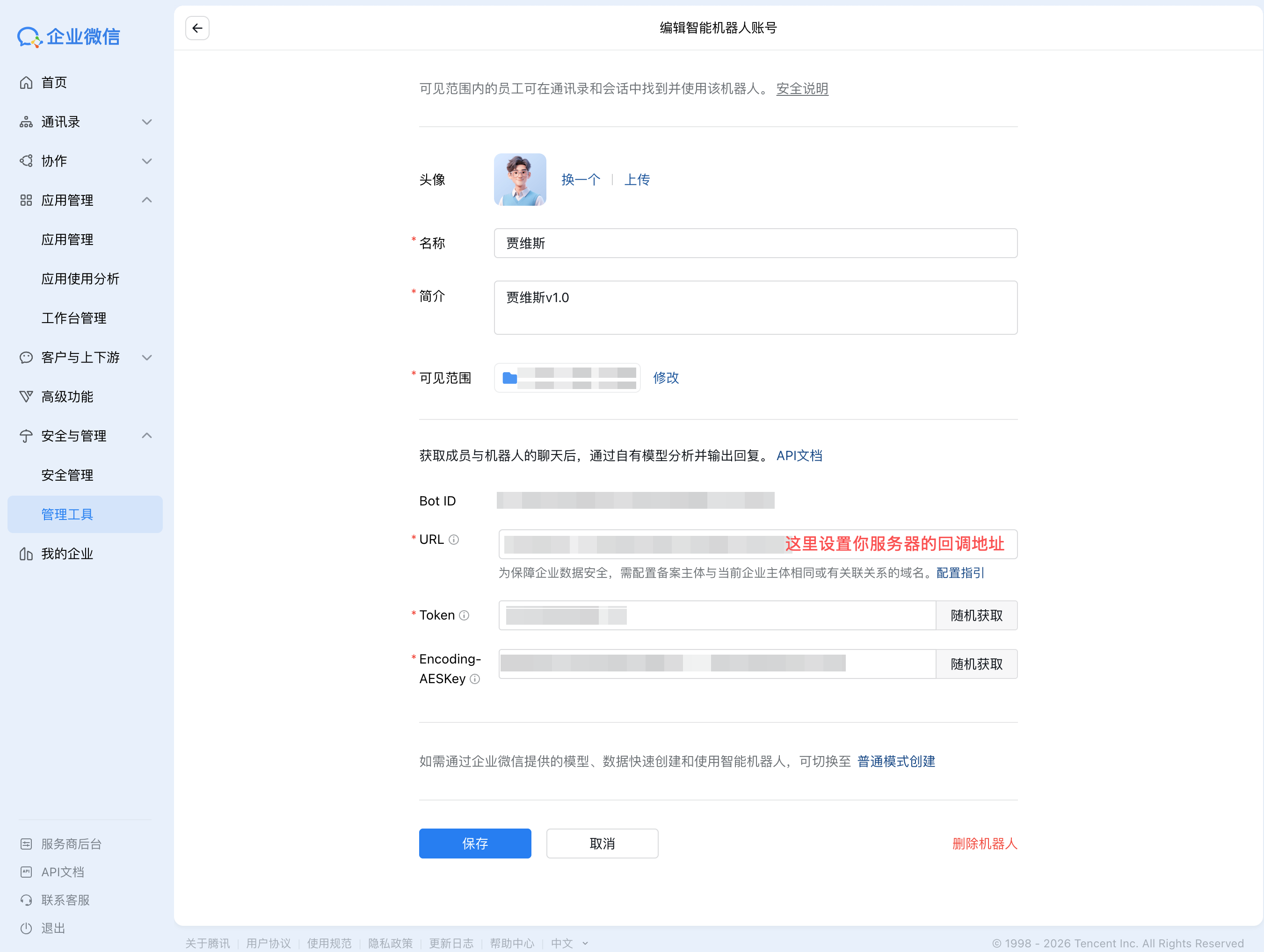
- 进入「安全与管理」→「管理工具」→「智能机器人」
- 创建机器人,选择 API 模式
- 填写回调 URL:
https://your-domain.com/plugins/wecom/bot/{accountId}(例如默认账号:https://your-domain.com/plugins/wecom/bot/default) - 记录 Token 和 EncodingAESKey
- 登录 企业微信管理后台
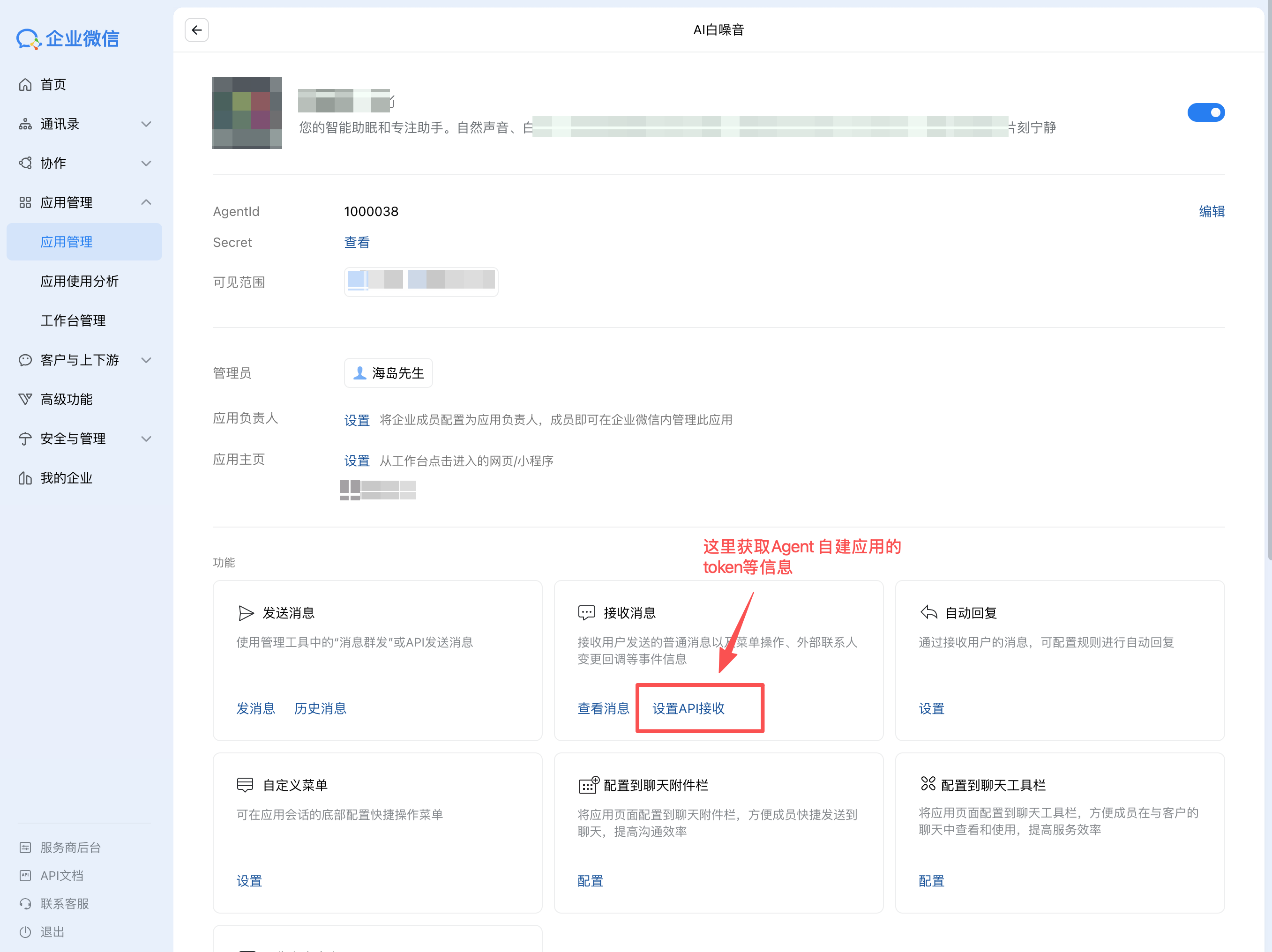
- 进入「应用管理」→「自建」→ 创建应用
- 获取 AgentId、CorpId、Secret
- 重要: 进入「企业可信IP」→「配置」→ 添加你服务器的 IP 地址
- 如果你使用内网穿透/动态 IP,建议配置
channels.wecom.network.egressProxyUrl走固定出口代理,否则可能出现:60020 not allow to access from your ip
- 如果你使用内网穿透/动态 IP,建议配置
- 在应用详情中设置「接收消息 - 设置API接收」
- 填写回调 URL:
https://your-domain.com/plugins/wecom/agent/{accountId}(例如默认账号:https://your-domain.com/plugins/wecom/agent/default) - 记录回调 Token 和 EncodingAESKey
Agent 输出 {"template_card": ...} 时自动渲染为交互卡片:
- ✅ 单聊场景:发送真实交互卡片
- ✅ 按钮点击:触发
template_card_event回调 - ✅ 自动去重:基于
msgid避免重复处理 - ⚠️ 群聊降级:自动转为文本描述
本插件深度集成了 OpenClaw 的 Cronjob 调度能力,配合 Agent 强大的广播 API,轻松实现企业级通知服务。
核心场景:早报推送、服务器报警、日报提醒、节日祝福。
无需遍历用户列表,直接利用 Agent 强大的组织架构触达能力:
| 目标类型 | 格式示例 | 推送范围 | 典型场景 |
|---|---|---|---|
| 部门 (Party) | party:1 (或 1) | 📢 全员广播 | 全员通知、技术部周报 |
| 标签 (Tag) | tag:Ops | 🎯 精准分组 | 运维报警、管理层汇报 |
| 外部群 (Group) | group:wr... | 💬 群聊推送 | 项目组群日报 (需由Agent建群) |
| 用户 (User) | user:zhangsan | 👤 即时私信 | 个人待办提醒 |
只需在工作区根目录创建 schedule.json 即可生效:
{
  "tasks": [
    {
      "cron": "0 9 * * 1-5", // 每周一至周五 早上9:00
      "action": "reply.send",
      "params": {
        "channel": "wecom",
        "to": "party:1",      // 一键发送给根部门所有人!
        "text": "🌞 早安!请查收[今日行业简报](https://example.com/daily)。"
      }
    },
    {
      "cron": "0 18 * * 5",
      "action": "reply.send",
      "params": {
        "channel": "wecom",
        "to": "tag:Ops",       // 仅发送给运维组
        "text": "🔒 周五封网提醒:请检查服务器状态。"
      }
    }
  ]
}
- 默认 (Bot 回复):群聊里 @Bot,默认由 Bot 在群内直接回复(优先文本/图片/Markdown)。
- 例外 (文件兜底):如果回复内容包含非图片文件(如 PDF/Word/表格/压缩包等),由于企微 Bot 接口不支持,插件会自动:
- Bot 在群里提示:"由于格式限制,文件将通过私信发送给您"。
- 无缝切换到 自建应用 (Agent) 通道,将文件私信发送给触发者。
- 提示:若未配置 Agent,Bot 会明确提示“需要管理员配置自建应用通道”。
- 超时熔断:企业微信限制 Bot 流式回复窗口约为 6 分钟。
- 自动接力:当对话时长接近此阈值时,Monitor 会自动截断 Bot 流,提示 "剩余内容将私信发送",并立即启动 Agent 通道私信发送完整结果。这彻底解决了长思考任务(如深度推理、代码生成)因超时导致用户收不到结果的问题。
- 群发保护:Agent 主动发送接口不再尝试向普通群
chatid(wr/wc...) 发消息(该路径常因权限与归属产生的隐蔽错误)。 - 引导提示:系统会明确拦截并通过日志提示中文错误:"请使用 Bot 群内交付或改为私信目标(userid/部门/标签)",帮助管理员快速排查配置。
- 所有兜底逻辑(Fallback)触发时,如果因配置缺失导致失败,Bot 都会给出清晰的中文提示,而不是沉默或报代码错误,极大降低了排查难度。
针对社区反馈的高频问题,我们已在 v2.2.4 版本中全部解决:
Q1: 同时使用 Bot 和 Agent 会导致消息重复吗?
A: 不会。本插件采用“Bot 优先”策略。用户在哪个通道发消息,就从哪个通道回。只有在 Bot 无法处理(如发文件)时才会智能切换到 Agent 通道作为补充。
Q2: 使用内网穿透时,企业微信报错 60020 (IP 不白名单) 怎么办?
A: 新增了
config.network.egressProxyUrl配置。您可以配置一个拥有固定公网 IP 的代理服务器(如 Squid),让插件通过该代理与企微 API 通信,从而绕过动态 IP 限制。
Q3: 原生 Bot 模式支持图片,为什么 Agent 模式不行?
A: Agent 模式之前确实存在此短板。但在 v2.2.4 中,我们完整实现了 Agent 端的 XML 媒体解析与
media_id下载逻辑,现在 Agent 模式也能完美看图、听语音了。
Q4: 群里 @机器人 发送文件失败?
A: 因为企业微信 Bot 接口本身不支持发送非图片文件。我们的解决方案是:自动检测到文件发送需求后,改为通过 Agent 私信该用户发送文件,并在群里给出 "文件已私信发给您" 的提示。
Q5: 为什么在 Agent 模式下发送文件(如 PDF、Word)给机器人没有反应?
A: 这是由于企业微信官方接口限制。自建应用(Agent)的消息回调接口仅支持:文本、图片、语音、视频、位置和链接信息。不支持通用文件(File)类型的回调,因此插件无法感知您发送的文件。
Q6: Cronjob 定时任务怎么发给群?
A: Cronjob 必须走 Agent 通道(Bot 无法主动发消息)。您只需在配置中指定
to: "party:1"(部门) 或to: "group:wr123..."(外部群),即可实现定时推送到群。
Q7: 为什么发视频给 Bot 没反应?
A: 官方 Bot 接口不支持接收视频。如果您需要处理视频内容,请配置并使用 Agent 模式(Agent 支持接收视频)。
微信交流群(扫码入群):

维护者:mocrane
本项目采用 ISC License 开源协议,并在此强调以下要求:
- 保留署名:根据 ISC 协议,您在任何分发、修改或使用本项目(或其部分逻辑)时,必须在显著位置完整保留本项目的版权声明(Copyright Notice)。
- 尊重原创:本项目包含的“Bot/Agent 自动化互补架构”、“长对话超时接力”、“WeCom 全媒体流自动化处理”等核心逻辑均为作者 YanHaidao 独立思考与实践的原创成果。
- 维权申明:对于恶意删除署名、像素级抄袭、混淆视听的恶意搬运行为,作者保留在社区公示及通过法律途径维权的权利。
- 【SDK适配】♻️ 插件 HTTP 注册升级:入口改为
registerHttpRoute(/plugins/wecom+match=prefix+auth=plugin),适配 OpenClaw 新版插件接口。 - 【兼容修复】🔁 旧入口保持可达:同步注册
/wecom前缀路由,保障历史 Bot/Agent 回调地址继续可用。 - 【兼容性修复】🧩 OpenClaw 3.1 路由抢占问题修复:推荐回调地址升级为
/plugins/wecom/bot/{accountId}、/plugins/wecom/agent/{accountId},规避根路径 Control UI fallback 抢占 webhook。 - 【引导收敛】🧭 Onboarding 仅支持账号化配置:配置向导统一写入
channels.wecom.accounts.<accountId>,不再引导单账号旧结构。 - 【兼容策略】🔁 旧路径兼容保留:
/wecom/*历史回调路径保留兼容能力,但不再作为维护主路径。 - 【分流稳定性】🧭 路由识别增强:monitor 按插件命名空间账号路径识别,确保 Bot/Agent 分支稳定命中。
- 【链路一致性】🔒 Bot 回复不再误走 Agent:修复 Bot 上下文通道标识,避免
routeReply误触发到 outbound 主动发送链路。 - 【验证结果】✅ WeCom 插件测试通过:
10files /41tests。
- 【交付收口】🔄 修复 Bot 会话“正在搜索相关内容”不结束的问题,并在可用时推送最终流帧结束状态。
- 【媒体兜底】📎 统一非图片文件、媒体失败和超时场景为“Bot 提示 + Agent 私信兜底”闭环,确保结果可达。
- 【类型兼容】🧠 扩展
txt/docx/xlsx/pptx/csv/zip等常见文件类型识别,并保留application/octet-stream自动重试。 - 【工具治理】🛡 修复 Bot 会话
message工具禁用策略,避免绕过 Bot 交付链路导致会话错位。
- 【重磅更新】🎯 多账号/多智能体可用性增强:支持按
accountId做组内隔离(Bot + Agent + 路由绑定同组生效),动态 Agent 与会话键增加accountId维度,避免跨账号串会话。 - 【稳定性】🔁 生命周期兼容修复:适配新版 OpenClaw Gateway 生命周期,
startAccount改为长生命周期运行,修复“几秒一次重启 + health-monitor 二次重启”的循环问题。 - 【准确性】🔐 XML 字段保真修复:Agent XML 解析关闭自动数值化,保留
FromUserName前导0,并避免MsgId(64 位)精度风险,确保会话与回复目标不被误改。 - 【准确性】🧹 误回复修复:Bot/Agent 入站都增加事件过滤,
event、sys、缺失发送者(以及群聊缺失chatid)不再进入 AI 会话,避免“一个消息触发多人误回复”。 - 【可控性】🧱 配置安全护栏:新增多账号冲突检测,自动拦截重复
bot.token、重复bot.aibotid、重复agent(corpId+agentId)的配置并给出明确错误提示。 - 【可控性】🛠 账号管理修复:
deleteAccount改为仅删除目标账号,不再误删整个channels.wecom。 - 【易用性】📘 文档默认路径调整:README 快速开始与配置说明改为优先展示“多账号 + 多 Agent”矩阵配置;单账号模式保留为兼容方案。
- 【质量保障】✅ 回归保护:新增账号解析、冲突检测、动态路由隔离、生命周期与入站过滤测试。
- ✨ 动态 Agent 路由:新增按用户/群组隔离的动态路由功能,支持为每个对话主体自动分配独立的 Agent 实例(如
wecom-dm-xxx)。 - 🛠 自动注册机制:动态生成的 Agent 会自动异步注册到
agents.list配置中,实现多租户 Agent 的无感扩容与管理。 - 🛡 权限与兼容性:支持
adminUsers白名单绕过机制以使用主 Agent;功能默认关闭,确保对现有配置完全兼容。 - ⚙️ 精细化配置:新增
channels.wecom.dynamicAgents配置项,可独立控制私聊和群聊的动态路由行为。 - 🙏 特别致谢:感谢 WhyMeta 开发者对动态路由实施方案的贡献。
- 🛠 体验优化:WeCom 媒体(图片/语音/视频/文件)处理的默认大小上限提升到 25MB,减少大文件因超限导致的“下载/保存失败”。
- 📌 可配置提示:若仍遇到 Media exceeds ... limit,日志/回复会提示通过 channels.wecom.media.maxBytes 调整上限,并给出可直接执行的 openclaw config set 示例命令。
- 🚀 架构升级:实施 "Bot 优先 + Agent 兜底" 策略,兼顾流式体验与长任务稳定性(6分钟切换)。
- ✨ 全模态支持:Agent 模式完整支持接收图片/语音/视频(文件仅支持发送)。
- ✨ Cronjob 增强:支持向部门 (
party:ID) 和标签 (tag:ID) 广播消息。 - 🛠 Monitor 重构:统一的消息防抖与流状态管理,提升并发稳定性。
- 🛠 体验优化:修复企微重试导致的重复回复(Bot/Agent 均做
msgid去重);优化 Bot 连续多条消息的排队/合并回执,避免“重复同一答案”或“消息失败提示”。 - 🐞 修复:Outbound ID 解析逻辑及 API 客户端参数缺失问题。
- 🎉 重大更新:新增 Agent 模式(自建应用)支持
- ✨ 双模式并行:Bot + Agent 可同时运行
- ✨ 多模态支持:Agent 模式支持图片/语音/文件/视频的接收与自动下载
- ✨ AccessToken 自动管理:缓存 + 智能刷新
- ✨ Agent 主动推送:脱离回调限制
- ✨ XML 加解密:完整 Agent 回调支持
- 📁 代码重构:模块化解耦设计
- 文档:补充入模与测试截图说明
- 新增文件支持
- 新增卡片支持
- 项目更名:Clawdbot → OpenClaw
